
Optimizing Kubernetes pod deployments for reliability with topology spread constraints
If you’re like many Kubernetes users, you don’t pay much attention to where or how Kubernetes distributes your pods. As long as they’re running, it doesn’t matter where they get deployed, right? Surely Kubernetes will use some complex algorithm to figure out the most reliable way to distribute your pods across the cluster…right?
Pod distribution plays a much bigger role in reliability than you might think. Fortunately, it’s easy to control when, where, and how Kubernetes distributes pods. By adding a few lines to your manifest, you can ensure your deployments are zone-redundant and evenly scalable. The feature is called topology spread constraints, and in this blog, we’ll explain how it works in full detail.
Why are topology spread constraints important for reliability?
Topology spread constraints determine how Kubernetes distributes pods across failure domains, such as regions, zones, and nodes. This helps ensure your workloads are truly distributed not just across the cluster, but across your operating environment. You can set cluster-level constraints as a default, or set constraints for individual workloads.
How to configure topology spread constraints
Topology spread constraints are defined using the field spec.topologySpreadConstraints. These can be applied to a pod or to the cluster. Constraints have the following fields:
maxSkew: the degree to which pods may be unevenly distributed. Its behavior depends on the value ofwhenUnsatisfiable:- If
whenUnsatisfiable: DoNotSchedule, this determines the maximum difference between the minimum number of pods in the domain vs. the number of matching pods in the target topology. In other words, this is how far off the minimum a domain is allowed to get. - If
whenUnsatisfiable: ScheduleAnyway, Kubernetes gives a higher precedence to topologies that would help reduce the skew.
- If
minDomains: the minimum number of eligible domains (e.g. availability zones or regions).topologyKey: the node label used to identify nodes used for this constraint. Any nodes that have this label are grouped into topology domains according to their values. For example, usingtopology.kubernetes.io/zoneas a key creates domains based on the availability zones your hosts span.whenUnsatisfiable: how to handle pods that don’t satisfy the spread constraint. By default, it won’t be scheduled (DoNotSchedule). Setting this toScheduleAnywayschedules the pod regardless, prioritizing nodes that minimize themaxSkew.labelSelector: the pod label used to find matching pods.matchLabelKeys: a list of pod label keys to use to calculate the spreading skew.nodeAffinityPolicy: determines how to treat each pod’snodeAffinityandnodeSelectorsettings.Honor(the default) limits the topology calculation to these nodes, whileIgnoreuses all nodes.nodeTaintsPolicy: determines whether to include node taints in the topology calculation.
Note that you can define only one topologySpreadConstraint for a given topologyKey and whenUnsatisfiable pair.
How to add a topology spread constraint to a Kubernetes manifest
Imagine we have a Kubernetes cluster distributed across three availability zones: us-east-1a, us-east-1b, and us-west-2a. We also have a pod that we want to deploy and replicate for redundancy. We’ll start with the following manifest:
If we deploy four replicas of the pod using a round-robin algorithm, we end up with one node with two pods and two nodes with one pod:
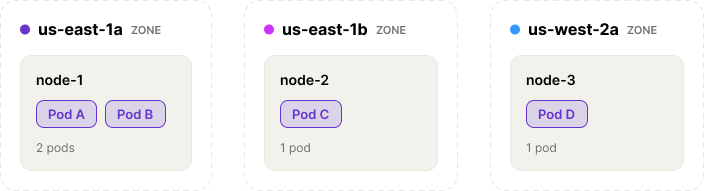
However, the Kubernetes scheduler might deploy two pods to two nodes, leaving one empty; or it might deploy three pods to us-east-1a and one to us-east-1b, which puts us at risk if the us-east region ever goes down. Or, in the worst case, it could deploy all four to one node and create a single point of failure.

- Let’s first limit the pod imbalance by setting
maxSkewto 1. This ensures that no single node has more than one additional replica of the pod than any other node. - Next, we’ll set the
topologyKeytotopology.kubernetes.io/zone, since we want to limit the spread by zone even if our zones span multiple regions. - We want Kubernetes to run the pod even if it can’t satisfy our topology constraints, so we’ll set
whenUnsatisfiabletoScheduleAnyway. - We want to match all Nginx pods (in this deployment, anyway), so let’s add a
labelSelectorthat matchesapp: nginx.
Now, our manifest looks like this:
How to find pods with missing topology spread constraints
You can use the kubectl command-line tool to retrieve a list of pods, then use the jq command-line tool to filter pods that don’t have topologySpreadConstraints defined. For example:
You can also use Gremlin’s built-in Detected Risks feature to automatically scan your Kubernetes pods for missing topology spread constraints.
Once you’ve added your constraints, re-run this command to ensure your pods don’t appear in the output. If you’re using Gremlin, the “topology spread constraints absent” risk status will automatically change from “at-risk” to “mitigated” and your service’s reliability score will increase.
Combining topology spread constraints, node affinity rules, and taints and tolerations
As we already saw, topology spread constraints can interact with other Kubernetes features, particularly node affinity rules and taints and tolerations. But there are subtle differences between these.
Affinity rules define the specific criteria for scheduling a pod on a node. For example, a pod running a large language model (LLM) might have an affinity rule that requires a node with a GPU. This way, you can combine affinity rules and topology spread constraints to limit the domain of nodes available to a pod. Just make sure you set nodeAffinityPolicy: Honor (the default).
Conversely, taints specify where not to schedule a pod unless it has a matching toleration. If a node’s GPU crashes due to a driver issue, you don’t want Kubernetes scheduling LLMs onto that node. Instead, you can apply a taint that prevents Kubernetes from scheduling pods on that node, while also migrating running pods onto new nodes. Like affinity rules, these work in tandem with topology spread constraints by limiting the size of the domain, as long as you set nodeTaintsPolicy: Honor.
Other Kubernetes risks to watch out for
Topology spread constraints are just one piece of a resilient Kubernetes deployment. If you want to know how to protect yourself against other risks like missing liveness probes, unset resource requests, and improperly configured high-availability clusters, check out our comprehensive ebook, "Kubernetes Reliability at Scale."
In the meantime, if you'd like a free report of your reliability risks in just a few minutes, you can sign up for a free 30-day Gremlin trial, or use Gremlin's Detected Risks feature to automatically scan your existing Kubernetes pods for missing topology spread constraints.
K8s Reliability at Scale
To learn more about Kubernetes failure modes and how to prevent them at scale, download a copy of our comprehensive ebook
Get the Ultimate Guide
How to troubleshoot unschedulable Pods in Kubernetes
Do you have a Kubernetes Pod that just won't start? You're not alone; unschedulable Pods are a common issue. Learn how to get your stuck services up and running in this blog.
.avif)
Kubernetes is built to scale, and with managed Kubernetes services, you can deploy a Pod without having to worry...
Read moreHow to ensure consistent Kubernetes container versions
Discover the challenges of maintaining version uniformity in Kubernetes container deployments and the risks of running multiple versions simultaneously. Learn how to ensure consistent container versions through tags, digests, manifest file checks, and alternative deployment strategies.

One of Kubernetes' killer features is its ability to seamlessly update applications no matter how large your deployment is. Did a developer make a code change, and now you need to update a thousand running containers? Just run kubectl apply -f manifest.yaml and watch as Kubernetes replaces each outdated pod with the new version.
Read moreManaging slow container starts with Kubernetes readiness probes
Pods without readiness probes are like engineers without coffee. Learn how readiness probes work, why they’re important, and how to configure them correctly.

Pods without readiness probes are like engineers without coffee. Learn how readiness probes work, why they’re important, and how to configure them correctly.
Read more