
How to verify your Azure Application Gateway is zone-redundant
Having a redundant failsafe is one of the best things you can do to ensure high availability in the cloud. It’s rare for cloud regions to go offline, but it can happen, even on major platforms like Azure. While you might not have control over your provider’s reliability, you do have control over your own, and redundancy is a key part of that.
Here’s how you can check if your Application Gateways are availability zone (AZ) redundancy, and how to verify redundancy using active testing.
What is availability zone (AZ) redundancy, and why is it important in Azure?
A service is AZ-redundant when it can continue operating and serving traffic even if the AZ it’s located in fails. This is achieved when:
- The service is replicated across two or more zones.
- Your traffic gateway, router, or switch automatically routes traffic between each zone, and can respond to zone failures by identifying and redirecting traffic to healthy zones.
In Azure, AZs correspond to physically independent groups of datacenters. Note the word “groups:” an AZ can have multiple data centers for redundancy. If an AZ fails, that doesn't necessarily mean that every resource in that AZ becomes unavailable, since the failure could be localized to a specific data center.
Don't assume that Azure's redundancy means your applications are redundant. Azure’s responsibility for reliability stops when you click “Create a resource.” Like most cloud providers, Azure follows a shared responsibility model: Azure manages the reliability of the cloud, while you manage the reliability of resources in the cloud. When we talk about AZ redundancy, we’re referring to the workloads that your team deploys to Azure's infrastructure.
Why Application Gateway redundancy is important
Application Gateways and Web Application Firewalls (WAFs) control the flow of traffic between your web applications and users, making them critical infrastructure. If your Application Gateway fails, then users will see your service as unavailable, no matter how reliable the underlying software or infrastructure is.
How to determine whether your Application Gateway is AZ-redundant
If you deployed a Standard_v2 or WAF_v2 gateway into a region that supports availability zones, Azure created it as zone-redundant by default. Every zone-redundant gateway runs a minimum of two instances, even when the Azure portal reports one, and the platform automatically scales those instances to match traffic volume and replace unhealthy instances. Azure distributes those instances across multiple zones, typically two or three depending on region capacity. You can override the default by pinning the gateway to one zone, but Microsoft only recommends doing so when latency is a strict requirement.
Remember that zone configuration is set at deployment time. If your gateway is zonal (pinned to one zone) and you want to make it zone-redundant, you can't simply change a setting. Per Microsoft, you'll need to deploy a new gateway and cut traffic over to it.
Zone configuration is set at deployment and can't be changed on an existing gateway. In a region that supports zones, every gateway is either zone-redundant or zonal, and moving between the two means deploying a new gateway.
Zone-redundant gateways automatically initiate failover when Azure detects a zone failure. Requests that are being processed in the failed zone are terminated, which could interrupt user sessions. Microsoft recommends configuring your applications to be resilient to transient (short-term) faults by using techniques like retries and circuit breakers.
Azure will try to preserve capacity by spinning up temporary instances in the surviving zones, but treat this as best effort rather than a guarantee. Application Gateway runs on virtual machine scale sets, which balance zones on a best-effort basis, so scaling can stall when capacity doesn’t divide evenly across the remaining zones. Be sure to size your autoscaling maximum with enough headroom for the surviving zones to absorb the redistributed traffic.
Once the zone is back online, Azure will automatically restore the failed instances, remove the replacements it created, and redistribute traffic normally across all zones.
Validating Application Gateway redundancy
While Azure will automatically detect Application Gateway failures, it won’t detect failures in the service(s) that call the gateway.
For example, imagine you have a web application that makes calls to a service behind an Application Gateway (e.g. a web application calling a cache). The cache is running behind an Application Gateway in az1, with a replica in az2. If az1 fails, Azure will automatically re-route traffic to az2, but what happens to your web application? Does the application detect that the connection was terminated and retry? Does it display an error message to the user? Does the replica have the latest data that the user was working with? If not, how does that reflect on the end user’s screen?
It's not enough to assume that your resilience mechanisms will work as expected, and there are a few ways you can validate that they will.
Validating in Azure
Start with the configuration, because a gateway that was never zone-redundant has nothing to fail over to. The gateway resource carries a zones property, and that property is the authoritative answer:
An empty or absent zones list means the gateway can use every zone in the region, which is the configuration Microsoft recommends. Two or more entries mean the gateway is zone-redundant across the zones listed. A single entry means the gateway is zonal, and a failure in that zone takes it offline until the zone recovers.
If you have multiple gateways deployed, you can run an Azure Resource Graph query to audit your whole estate at once:
Next, make sure you'll get notified about zone failures. Create an alert on Azure Resource Health, which reports the health of an individual resource, and Azure Service Health, which reports the health of the platform. Without those alerts, a zonal gateway can go dark and your first signal will be a support ticket.
For testing the failure itself, Azure offers Chaos Studio. Its Compute Zone Down scenario simulates a zone outage by shutting down virtual machines and virtual machine scale set instances in a zone you choose, which is a reasonable way to watch traffic redistribute. However, you should be aware of three limitations:
- Chaos Studio can’t fail a zone for the Application Gateway itself, so you’re testing the compute behind the gateway rather than the gateway.
- Chaos Studio Workspaces and Scenarios are in public preview, which Microsoft states isn’t meant for production use.
- Chaos Studio only targets Azure, so an estate spanning AWS, GCP, or on-prem needs a separate tool and a separate process for each.
There’s a larger gap, and Microsoft names it directly. For zone-redundant gateways, the Application Gateway reliability guide says the platform handles zone failure scenarios transparently and that you don’t need to initiate or validate availability zone failure processes. Read narrowly, that’s accurate: Microsoft manages detection, failover, and failback for the gateway. It says nothing about the services calling through it however, and validating those are your responsibility.
Validating with fault injection
The most effective way to answer this question is by testing what happens when az2 fails. While we can’t take the AZ down ourselves, we can simulate a zone failure using a blackhole experiment.
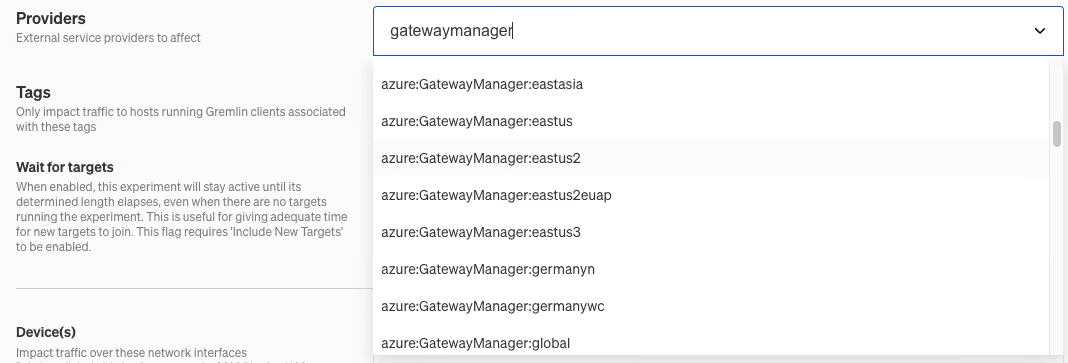
Blackhole drops network traffic to and from the target. Left at its defaults it drops all traffic to and from the hosts you target. Two controls scope it down to a zone: zone selectors decide which hosts get targeted, and the Providers menu (along with IP addresses, hostnames, and ports) decides which destinations get dropped. Here’s how this looks in practice:
- Create a new experiment and select the target(s) you want to run it against. Under Hosts, click the Selectors tab, expand Zone, and select the zone you want to simulate the failure in.
- Select Blackhole as the experiment type. By default, Blackhole drops all network traffic except traffic to and from api.gremlin.com and DNS traffic, so the agent stays reachable for the duration of the experiment.
- Attach a Health Check, then run the experiment. Watch whether your web application still reaches the cache, how long the interruption lasts, and whether requests error out instead of retrying. If the Health Check fails, Gremlin halts the experiment and rolls the fault back automatically.
An alternative approach is to run the experiment on a service that communicates with the cache’s Application Gateway, then using the Providers menu to select the zone you want to simulate the failure in. The benefit of this approach is that it only makes the zone appear offline to a single service (the service being targeted):
Validating with Detected Risks
A blackhole experiment tells you whether one gateway survives one failure at one moment. It doesn’t tell you which of your three hundred gateways are misconfigured right now. For that, you can use Detected Risks.
When you map a Gremlin service to an Azure Application Gateway, Gremlin reads the gateway’s configuration and continuously checks it against three common Azure risks:
- No AZ redundancy. Gremlin reads the gateway’s zones property. The service is marked at risk if there are fewer than two entries, because a gateway pinned to a single zone fails with that zone.
- Autoscaling missing. Gremlin checks autoscaleConfiguration and marks the service at risk when the value is null. This failure mode compounds when an AZ fails: traffic will be redistributed to the surviving zones, and a fixed-capacity gateway has no room to grow and absorb the surge. It also affects your agreement with Azure, since a gateway only qualifies for the Application Gateway SLA if it’s zone-redundant or configured to autoscale.
- SSL certificate expiring soon. Gremlin decodes sslCertificates.publicCertData, reads the notAfter date, and marks the service at risk when the certificate expires within 30 days. Gateways that pull certificates from Key Vault aren’t flagged, since Key Vault handles rotation.
Each risk shows one of three statuses on the service details page: At Risk, Mitigated, or N/A. For any At Risk services, just edit (or redeploy) your gateway and Gremlin will automatically re-evaluate the risk. When the risk changes to Mitigated,
The value here is the recheck, not the first result. Anyone can audit their gateways once. The gateway that hurts you is the one that passed in March and got rebuilt from a template with a hardcoded zone list in September. Detected Risks surfaces that as a risk on a dashboard instead of an incident at 3am.
Redundancy you haven’t tested is a hope, not a guarantee
Azure gives you zone redundancy for Application Gateway by default, and it costs nothing extra. That also makes it easy to lose without noticing. An engineer pins a gateway to one zone to shave cross-zone latency. A template hardcodes a zone list. A migration rebuilds a gateway with different parameters. None of it shows up on a dashboard, because the gateway stays green right until its zone doesn’t.
Two checks close that gap, and they answer different questions. Detected Risks tells you which gateways are misconfigured today, across every subscription, without running a test. A blackhole experiment tells you whether the services calling through those gateways survive the failover, which is the half Azure leaves to you.
Uptime tells you how your gateways behaved last quarter. Run both checks and you can answer the question leadership is actually asking: which services are at risk right now, and what happens to them when a zone goes down.
Gremlin flags Azure Application Gateway risks automatically once you connect your Azure account, alongside the same checks for AWS, GCP, and Kubernetes. Start a free 30-day trial to see which of your gateways are at risk, or request a demo to walk through Detected Risks with a reliability engineer.
Start your free trial
Gremlin's automated reliability platform empowers you to find and fix availability risks before they impact your users. Start finding hidden risks in your systems with a free 30 day trial.
START YOUR TRIAL
Eliminate Reliability Blind Spots in AWS, Azure, and GCP
Discover reliability risks without running a single test. See how Gremlin identifies high-priority reliability risks across AWS, Azure, and GCP to prevent outages.

Discover reliability risks without running a single test. See how Gremlin identifies high-priority reliability risks across AWS, Azure, and GCP to prevent outages.
Read moreReliability lessons from the 2025 Microsoft Azure Front Door outage
In October 2025, Microsoft Azure Front Door and Content Delivery Network suffered a global outage. Find out what your team can do to minimize the impact of similar outages in the future.


In October 2025, Microsoft Azure Front Door and Content Delivery Network suffered a global outage. Find out what your team can do to minimize the impact of similar outages in the future.
Read more